

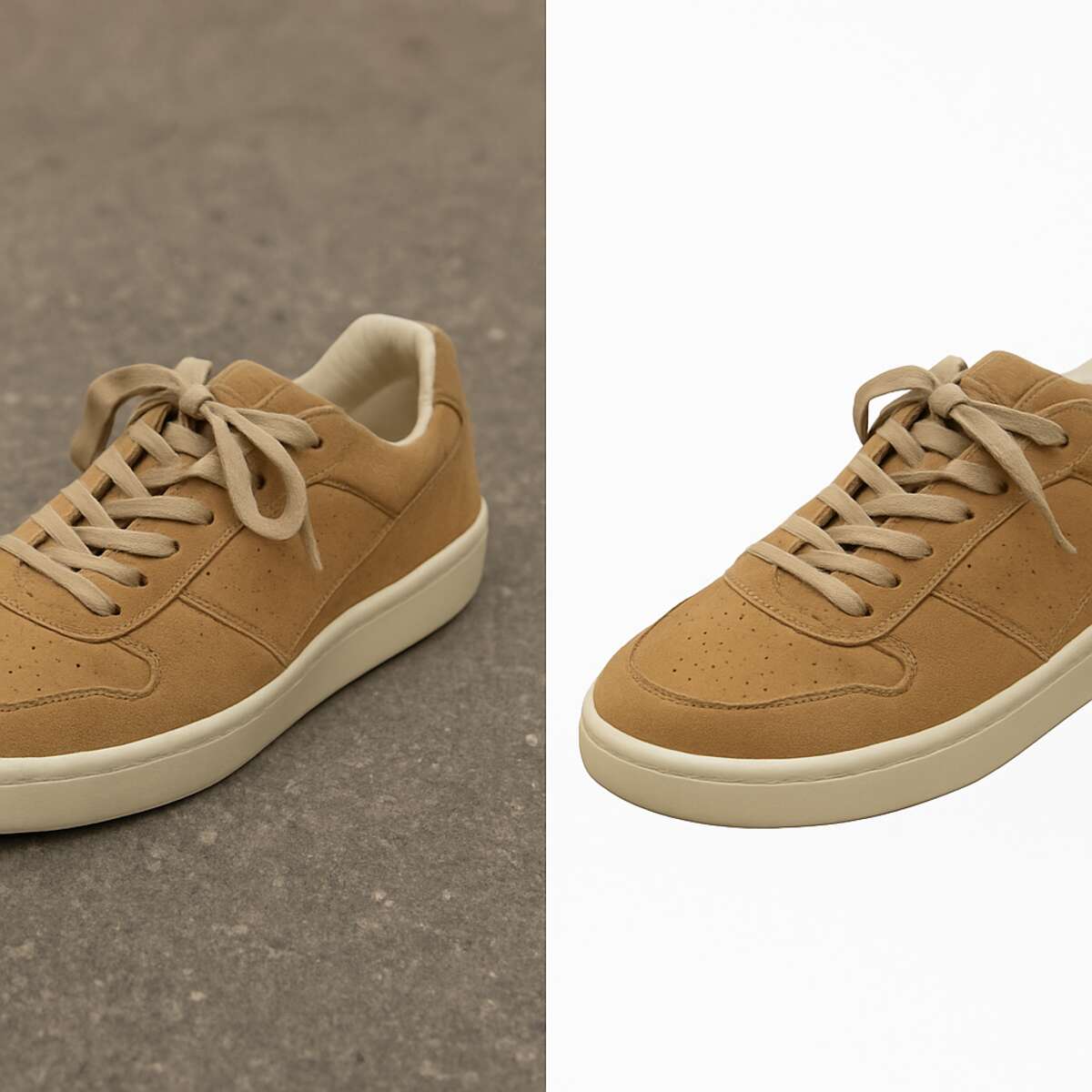
You’ve spent hours setting up the perfect lighting for your product photo, but in the final shot, a distracting shadow ruins the professional vibe. Have you ever wondered why products on Amazon look so crisp and perfectly isolated against a clean white background? It isn’t a special camera at work—those major retailers rely on manual editing to carefully cut out items like digital scissors, removing messy backgrounds completely. Check out clippingpathwise.com to know more
According to industry research, 67% of consumers consider image quality “very important” when making an online purchase. Because shoppers cannot physically hold your items, these pictures act as a direct proxy for product quality. Clean visuals instantly reduce buyer hesitation while establishing the visual consistency that builds brand authority across your entire catalog.
Finding a trustworthy partner to handle this daily editing is essential for scaling your business. By partnering with a professional background removal service like Clipping Path Wise, you ensure that every image receives precise, hand-tailored attention rather than jagged automated cuts. We make it simple to upgrade your visual storefront and improve ecommerce conversion, freeing you up to focus on growing your brand.
Digital Scissors: What a Clipping Path Actually Does for Your Photos
A clipping path acts like highly precise digital scissors, snipping an item right out of a messy background. Editors trace an invisible outline around the subject of your photo, separating it completely from whatever is behind it.
Unlike automated “wand” tools that leave jagged edges, a manual approach guarantees a flawless fit. When you use professional clipping path services for background removal, the process involves three simple steps behind the scenes:
- Tracing: A human expert follows every curve of your item.
- Path Creation: The software locks in this exact digital outline.
- Isolation: The background is erased, leaving only your crisp product.
Once your item is cleanly separated by the team at Clipping Path Wise, the possibilities open up. You can easily drop that isolated sneaker onto a pure white backdrop to meet Amazon’s strict requirements, or place it in a new marketing graphic. This flawless edge is exactly what drives the professional standards of marketplace-ready product shots.
The Professional Standards of Marketplace-Ready Product Shots
Getting your products listed online is only half the battle; getting them seen requires playing by the strict rules of platforms like Amazon, eBay, and Google Shopping. These major marketplaces demand a uniform, clean look so customers can easily compare items. Relying on a “good enough” quick fix often leads to rejected listings. By completely removing distracting backgrounds from product shots, you eliminate visual noise that actively hurts your search visibility. When your images look crisp and perfectly isolated, buyers are more likely to click and trust your storefront.
Beyond just looking professional, precise background removal ensures your item occupies the exact right amount of space in the image frame. While it might be tempting to use a quick automated app to isolate your product, taking that shortcut often ruins the edges of your items. To keep your listings active and ranking high, using a manually traced outline is the safest way to consistently meet strict platform guidelines, such as the standard requirements for Amazon:
- Pure white background (RGB 255,255,255)
- 85% frame coverage
- No watermarks
The Hidden Cost of AI-Generated Background Removal
You might have tried a one-click background remover on your phone or computer, expecting instant perfection. These automated tools promise a quick fix, but the results often fall apart when you look closely. Instead of a crisp, clean product ready for your storefront, you are left with a messy image that actively works against your sales goals.
The biggest giveaway of an automated edit is something called the “halo” effect. This happens when the software confuses your product with the background, leaving a jagged, fuzzy ring of leftover pixels around the edges. Sometimes the AI even accidentally eats right into the item itself, chopping off the delicate strap of a handbag or blurring the sharp, clean edge of a jewelry box.
Shoppers today are highly visual and incredibly cautious about where they spend their money online. When a customer sees those uneven edges and missing pieces, it immediately signals low quality and can even make a legitimate listing look like a scam. Partnering with a professional background removal service guarantees that your buyers see a flawless, trustworthy product without any distracting flaws.
Protecting your store’s reputation means relying on human expertise rather than trusting a blind algorithm to guess where your product ends. Using manual selection for high precision cutouts ensures that an actual person reviews every single curve and corner of your item. Relying on this human touch is much like choosing a perfectly custom-tailored suit over a cheap, mass-produced shirt.
Hand-Drawn vs. Automated: The ‘Tailored Suit’ Comparison
Automated background removers treat your product photos like a poorly fitting mass-produced shirt. While an AI algorithm guesses the outline of a shoe, human eyes can instantly distinguish the tricky difference between a dark shadow and the actual edge of your product. A real person looks at your item and understands exactly where the background ends.
Crafting a flawless image requires the digital equivalent of a master tailor. If you watch a professional demonstrate how to use a photoshop pen tool for cutouts, they place tiny digital pins—called “anchor points”—along the exact outline of your item. This creates a manual path that perfectly hugs natural curves, avoiding the jagged edges left by quick apps. Relying on professional clipping path services guarantees your product is carefully traced by hand.
Ultimately, this custom approach fits the specific shape of your business needs, ensuring every photo looks premium to shoppers. Because every item you sell has a unique silhouette, the effort required to trace it will naturally vary.
Identifying Basic vs. Complex Clipping Paths
The time and money required for photo editing depends entirely on the physical shape of your product. The cost of clipping path services relies on how many curves, corners, and “holes” need to be carefully traced by hand. Accurate categorization helps you predict costs and plan a smart budget for your e-commerce store.
Every item has a unique silhouette, and professional editors group them into four main levels based on the required effort:
- Basic: A rectangular box or a smartphone with simple straight lines.
- Simple: A coffee mug featuring gentle curves and a single “hole” for the handle.
- Complex: A bicycle wheel, containing multiple overlapping spokes and gears.
- Super Complex: Delicate lace, netting, or loose fur that demands intense precision.
While intricate shapes require extra time to trace by hand, they also deliver the biggest “wow” factor for your shoppers when cleanly isolated against a white background. Whether you sell straight-edged boxes or complicated bicycles, leveraging affordable bulk image retouching solutions keeps your entire catalog looking premium.
Beyond Simple Cutouts: The Power of Multi-Path Editing
Showcasing a single sneaker design in five different colors usually requires funding five separate photoshoots. Capturing every single variation of a product under studio lighting is incredibly expensive and time-consuming. Instead of paying a photographer every time you release a new seasonal shade, professional editors use a targeted outlining technique to isolate specific parts of your product from just one original photo.
To achieve this flexibility, consider how multi-path editing services upgrade standard background removal. Imagine using digital scissors to cut out not just the entire shoe, but also to create completely separate, saved outlines for the laces, the rubber sole, and the leather panels. By defining these individual sections, a designer can instantly change the dye color of the leather without accidentally tinting the crisp white rubber sole. This precision is the foundation of any modern color correction and image enhancement guide, giving you total control over different textures and tones within a single image.
Using these customized, isolated paths saves thousands of dollars in re-shooting costs while ensuring every variation looks beautifully realistic on your storefront. While this technique works wonders for solid, smooth items, some products refuse to be contained by a sharp line. When your photo involves fuzzy textures or wispy edges, you must step away from the digital scissors and turn to image masking.
Image Masking: Solving the Hair and Fur Nightmare
While digital scissors work perfectly for the crisp edges of jewelry or electronics, they completely fail when faced with soft, fuzzy textures. Imagine trying to isolate a model with windblown hair, a delicate lace dress, or a fluffy puppy for a pet store ad. If you force a sharp border onto a wispy edge, the result looks like a terrible, blocky haircut, and your product photo immediately loses its premium feel.
To save these delicate details, editors switch to a more advanced technique called image masking. In a standard image masking vs clipping path comparison, think of masking as a fine paintbrush rather than sharp scissors. It gently lifts away the unwanted background while protecting the finest strands. A professional background removal service relies on this careful method to preserve every stray hair or sheer fabric weave without leaving harsh, jagged borders.
Combining these smooth, masked edges with sharp paths guarantees a 100% natural look that builds immediate trust with your shoppers.
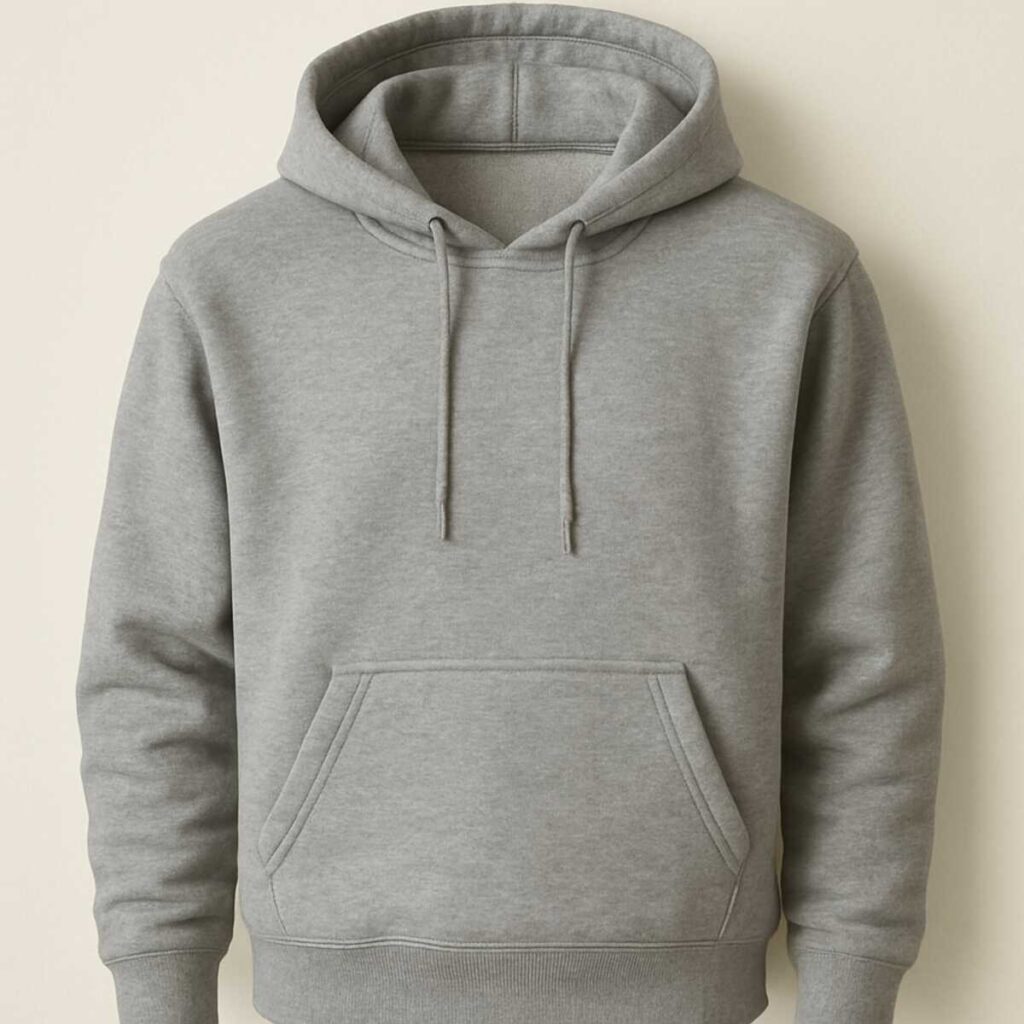
The Ghost Mannequin Effect: Dressing Your Products for Success
You have successfully removed the messy background, but simply laying a shirt flat on a table completely hides its true shape. Customers need to see how a garment actually fits, which is why photographing it on a mannequin works so well. However, staring at plastic arms and rigid necks distracts shoppers from your beautiful fabric. The “invisible person” technique solves this by combining a picture of the clothing on a dummy with a secondary shot of the inside collar.
Using a professional ghost mannequin service for apparel photography instantly gives your online storefront a premium, uniform look. Unlike flat-lays, this careful editing reveals the clothing’s natural volume while keeping the buyer’s focus strictly on your design. Enjoying these benefits of high-quality image post-processing builds incredible customer trust, as shoppers can easily picture themselves wearing the item without being thrown off by inconsistent models or visible plastic props.
Creating this 3D illusion requires careful attention to the hidden pieces that make a garment look whole. Our editors follow a strict Ghost Mannequin Checklist to ensure absolute perfection:
- Neck joining: Seamlessly blending the inside back collar with the shirt front.
- Inner label preservation: Keeping your brand tag visible and legible.
- Sleeve shaping: Rounding out cuffs so they never look flat or pinched.
Adding Depth with Drop Shadows and Natural Reflections
A cutout item on a crisp white background can often look as if it is awkwardly floating in mid-air. To anchor the merchandise and give shoppers a true sense of scale, adding drop shadow and reflection effects for products is essential. Creating these digital shadows during editing is actually much more consistent than trying to perfectly match studio lighting across hundreds of different camera shots.
Different merchandise requires distinct techniques to look its absolute best. A standard drop shadow mimics soft overhead lighting, giving everyday goods a clean finish. For bulkier items like sneakers, a cast shadow creates the illusion of directional sunlight, making objects feel realistically solid. Alternatively, a reflection makes it seem as though your product sits on a polished glass table. This specific mirror effect is the ultimate secret for luxury cosmetics and jewelry, instantly elevating your brand’s perceived value.
Trusting professionals with these subtle details transforms a basic catalog into a premium storefront. The experts at Clipping Path Wise craft these grounding effects by hand so they never look artificially stamped on.
Color Correction: Matching Digital Photos to Reality
Ordering a vibrant teal shirt online only to receive a dull navy one in the mail instantly damages brand trust. Cameras, changing room lighting, and varying computer screens often shift how a color originally appears. To fix this, experts use a process called color correction to carefully adjust the digital lighting and saturation, ensuring the photo perfectly matches the real-life item.
The financial benefit of getting those hues exactly right goes far beyond simple aesthetics. When shoppers trust that what they see is what they will get, sales naturally increase, effectively improving ecommerce conversion with better images. More importantly, highly accurate colors drastically reduce expensive return rates caused by disappointed customers claiming an item was “not as described.” This careful adjustment acts as a digital insurance policy for your profit margins.
Even the best photographers struggle to maintain consistency when shooting inventory on different days or under varying natural light. Following a professional color correction and image enhancement guide ensures your entire catalog looks seamlessly unified, despite those changing conditions. The experts at Clipping Path Wise precisely balance these tones by hand, saving you from the frustrating need for adjustments.
Outsourcing vs. DIY: Calculating Your Real Hourly Rate
Many business owners assume doing everything themselves saves money, but this ignores a critical hidden expense: opportunity cost. When you spend an afternoon trying to erase a messy background, you trade away hours that would be better spent on marketing, answering customer emails, or sourcing new products. The true price of doing it yourself is the growth your store loses while you are stuck staring at a computer screen.
The actual math behind preparing inventory for a new product launch reveals the true cost:
- DIY Editing: 15 minutes per photo × 50 photos = 12.5 hours of your valuable time.
- Professional Service: 0 hours of your time, allowing you to focus entirely on selling.
Growing a business is nearly impossible if you are constantly bogged down by repetitive tasks. By outsourcing ecommerce product photo editing, you hand the heavy lifting to specialists who deliver significantly cleaner results. Because they handle these specific adjustments all day, experts can flawlessly trace around complicated edges—like fuzzy sweaters or jewelry chains—in a fraction of the time it takes a beginner.
Your time is your most expensive asset, meaning paying a professional often costs far less than your own hourly labor. Relying on affordable bulk image retouching solutions frees up your schedule while guaranteeing a premium, trustworthy look for your shoppers.
What to Look for in a Professional Service Portfolio
Finding a trustworthy partner starts with examining their before-and-after galleries. When evaluating clipping path services, look closely at the real transformation from a messy original photo to a perfectly isolated product. A reliable provider proudly displays these comparisons, proving they can turn a cluttered, distracting background into a crisp, pure white canvas ready for your storefront.
To truly judge a professional background removal service, you must look beyond the overall picture and zoom right into the edges of the item. If those borders look blocky or jagged, the editor likely used a cheap automated tool instead of carefully cutting them out by hand. You are looking for a smooth, natural outline that makes your product look like a premium studio shot rather than a hasty digital cutout.
True expertise is also revealed by how an editor handles different physical materials. A strong portfolio should display a variety of challenging textures like shiny metal jewelry, soft fabric, and human skin, all while maintaining realistic lighting.
Communication Red Flags: Choosing a Reliable Partner
Perfect picture quality is only half the battle when you have a strict product launch deadline. If your chosen editing partner disappears when you need a quick adjustment, the entire process breaks down. A reliable team will always ask clarifying questions before they start working on your images, ensuring they understand exactly what you need right from the beginning.
Unfortunately, many clipping path services hide poor customer service behind flashy websites. To protect your business and your valuable time, keep an eye out for these critical communication red flags before handing over your files:
- No trial offered to test their manual editing quality.
- Slow email response times that delay your workflow.
- Vague pricing that changes after the work is done.
- Automated-only support with no way to speak to a real person.
Knowing exactly what happens when you request a revision gives you ultimate peace of mind. At Clipping Path Wise, we believe clear revision policies and fast, human responses are just as important as the crisp edges we create.
Understanding Bulk Pricing and Hidden Fees
Budgeting for product photos should never feel like a guessing game. When exploring clipping path services, you will notice that rates depend heavily on the shape of your item. A simple cardboard box takes our manual editors much less time to flawlessly cut out than a delicate piece of intricate jewelry. Because highly detailed items require extra care and time, they naturally cost a bit more. Be very cautious of providers offering suspiciously low flat rates for everything, as this usually indicates the use of sloppy, automated tools rather than dedicated human experts.
Volume discounts are the smartest way to manage these costs for larger projects. If you are launching an entirely new seasonal catalogue, reputable teams use tiered pricing models to help your budget stretch further. This simply means that the more photos you submit at once, the lower your final cost per image becomes. Utilizing these affordable bulk image retouching solutions allows growing online stores to process hundreds of products while keeping that crisp, custom-tailored look on every single shot.
Even with a great volume discount, always verify that your initial quote includes free adjustments. Genuine pricing transparency ensures you will not face surprise fees just because an edge needs a minor tweak after delivery.
Turnaround Times: Balancing Speed with Precision
Rushing your product launch because you are waiting on photos can be incredibly stressful. When you hire a professional background removal service, the standard delivery window is typically 24 to 48 hours for moderate volumes. This timeframe gives human editors the dedicated time they need to act as digital scissors, carefully tracing around every edge of your item. Unlike instant, automated AI tools that often leave jagged edges on your items, hand-drawn precision simply takes a little time to get perfectly right.
Sometimes, you might find yourself in a tight spot, needing images faster than that standard window allows. While Clipping Path Wise and other skilled teams can accommodate urgent 12-hour rush projects, these expedited services usually carry a premium fee because editors must prioritize your batch over others. The best practice to avoid these extra rush costs is to plan your photoshoot at least two days before your new website launch or Amazon listing goes live.
A well-planned schedule guarantees your final images look expertly tailored without straining your budget. Knowing exactly when your crisp, clean photos will arrive provides peace of mind as you prepare to sell.
Protecting Your Assets: Data Security and Privacy
Handing over photos of an unreleased product can feel nerve-wracking. You worked hard to design your upcoming collection, and a leaked image could easily ruin a highly anticipated launch. When using clipping path services, you need absolute certainty that your proprietary photos will never be shared, sold, or used in an editor’s public portfolio without your explicit permission.
A trustworthy editing partner treats your digital files like a locked vault. To guarantee your assets stay under tight control, professional teams like Clipping Path Wise implement strict security measures:
- Secure File Transfers: Using encrypted delivery methods (like Secure FTP) ensures your images cannot be intercepted online.
- Signed NDAs: Non-disclosure agreements provide a formal guarantee that your exclusive product designs remain completely confidential.
- Routine Image Deletion: Erasing your original and edited files from the company’s servers immediately after your project is completed.
Protecting your assets means you can focus entirely on your storefront rather than worrying about competitors stealing your ideas.
Preparing Your Files for the Editing Team
Gathering your photos is the first step, but the files you send make a massive difference. While standard JPEGs are great for sharing online, they are heavily compressed and lose tiny details when saved. Sending high-resolution original formats, such as RAW or TIFF files, gives the editing team a much sharper starting point. These larger files prevent blurry “pixelation” along the edges of your product, allowing our digital scissors to cut perfectly clean lines.
To guarantee your editor delivers the full benefits of high-quality image post-processing, organizing your batch is essential. Even though our experts know exactly how to create complex vector paths around difficult items, a little upfront preparation ensures we match your exact vision. Follow this simple checklist before uploading:
- Send high-resolution files: Provide original RAW or TIFF files whenever possible.
- Use clear naming: Label files consistently (e.g., “shoe_red_01.jpg”) to easily track requirements.
- Include specific instructions: Add direct notes, such as “keep the natural shadow,” to drastically reduce the need for revisions.
Clear communication right from the start means your products hit your storefront much faster.
Raster to Vector: Why Your Logo Needs a Clipping Path Too
You finally get your beautiful new product photos loaded onto your website, but now your company logo looks terribly blurry sitting next to them. This common frustration happens because standard image files are made of pixels, which are tiny, fixed squares of color. When you try to stretch that logo for a large banner or a modern website header, the computer simply stretches those tiny squares, resulting in a chunky, unprofessional mess.
Fixing this requires a specialized process known as raster to vector conversion for logos. Instead of relying on fixed squares, a professional editor uses a manual clipping path as a digital “connect-the-dots” map to carefully re-draw your design. Knowing exactly how to create complex vector paths around intricate text and curved shapes takes practice, but the final product is an outline that the computer remembers flawlessly, no matter how much you resize it.
Because these updated files rely on smooth lines rather than individual pixels, your branding remains perfectly crisp on everything from small business cards to massive billboards. Maintaining this sharp consistency across all your marketing materials builds immediate trust with your buyers.
Testing the Waters: How to Use a Free Trial Effectively
Trusting a new partner with your brand’s visuals can feel risky, so taking advantage of a free trial is the smartest first step. To get a true feel for a professional background removal service, do not send a simple photo of a square box. Instead, provide a “stress test” image, such as a piece of intricate jewelry or a fuzzy sweater, to see exactly how the editing team handles complicated edges.
When the edited photo arrives in your inbox, your next job is to inspect the manual work. Zoom in closely—around 300% on your screen—and follow the outline of your product. You should see a perfectly smooth curve that hugs the item naturally, without any jagged edges or awkward cutouts. This up-close inspection instantly reveals the true quality and speed you can expect from Clipping Path Wise.
Beyond the crisp images themselves, this trial period is your chance to evaluate the provider’s communication style. A reliable team will answer your questions clearly and make the entire process feel effortless rather than stressful.
Scaling Your Visuals: From 10 to 10,000 Images
Upgrading your storefront from a handful of items to a massive inventory is an exciting milestone, but it quickly introduces a new hurdle. When customers browse your catalog, they expect every item to look like it belongs in the same premium collection. If one pair of sneakers sits high in the frame while another is zoomed out with slightly darker lighting, your shop suddenly loses that polished, trustworthy vibe. Visual consistency is the secret ingredient that transforms a scattered online store into a highly professional brand.
Managing this sheer volume of photography yourself is a fast track to burnout, making outsourcing ecommerce product photo editing the smartest move for growing businesses. At Clipping Path Wise, we blend streamlined digital workflows with rigorous human quality checks to process thousands of pictures without losing that hand-tailored precision. Our editing experts ensure that every single product features identical background removal, centering, and sizing, so your entire catalog lines up perfectly on the screen.
You might assume that this level of flawless uniformity is only available to retail giants, but affordable bulk image retouching solutions level the playing field. By partnering with a team that can effortlessly handle your largest batches, you win back countless hours to focus on actually running your business.
The ROI of High-Quality Post-Processing
Treating professional photos as a simple business expense is a common trap for growing sellers. In reality, crisp, cleanly edited visuals are a direct investment in your bottom line. When a shopper cannot touch or try on your product, the photo essentially becomes the product. The benefits of high-quality image post-processing go far beyond making things look neat; they actively capture attention, helping you stand out in a crowded marketplace.
Upgrading your visual strategy creates a measurable ripple effect across your entire business. When you partner with experts, you unlock specific ROI metrics:
- Conversion rate boost: You start improving ecommerce conversion with better images that clearly showcase your item’s true value.
- Return reduction %: Accurate, distraction-free product shots mean fewer disappointed customers sending items back.
- Brand trust scores: Consistent, professional galleries instantly signal reliability and quality to new buyers. Beyond these numbers, faster professional editing means getting your new inventory listed and sold much sooner.
Securing these incredible returns depends entirely on who is holding the digital scissors. Outsourcing this crucial task to the wrong team can cost you valuable time and damage your storefront’s credibility.
Common Mistakes to Avoid When Hiring an Editor
Picking the cheapest automated service for your background removal might seem like a quick win, but it usually ends in frustration. AI tools act like one-size-fits-all shirts, working fine for basic shapes but leaving jagged, messy edges on complex products. Instead of spending hours trying to learn how to use a photoshop pen tool for cutouts to fix these sloppy automated mistakes, you need a human professional who acts like a custom tailor for your images.
A frequent oversight is forgetting to check the “inner paths” of your newly edited photos. Imagine a coffee mug or a stylish handbag—there is a closed space inside the handle where the original background still peeks through. Rushed automated editors frequently miss these interior spaces, leaving awkward patches of clutter that ruin the crisp product shot. Careful human editors will manually trace out these inside areas so your customer only sees the item itself.
Finally, assuming an editor knows exactly what you want without clear instructions guarantees a mismatched storefront. Creating a simple style guide—a basic checklist of your preferred margins, shadow types, and exact background colors—ensures every batch of photos aligns perfectly with your brand.
Your Success Roadmap: Selecting Your Editing Partner
Now that you know exactly what editing pitfalls to dodge, it is time to confidently choose a professional photo editing partner. You need a dedicated expert who cuts out your items with absolute precision, saving you hours of frustration while making your products look irresistible to buyers. Finding the right provider of clipping path services does not have to be overwhelming when you have a clear plan of action.
Before handing over your entire product catalogue, run potential editors through this Final Partner Checklist:
- Portfolio check: Ensure their past work looks crisp, clean, and perfectly isolated on white backgrounds.
- Trial success: Always request a free trial to verify their human precision on your actual images.
- Price transparency: Look for straightforward rates with no hidden fees for tricky items.
- Support response: Confirm their turnaround times fit perfectly within your busy marketing calendar.
Trusting your photos to a reliable team means you can finally stop wrestling with complicated software and get back to focusing on sales.
Transforming Your Business with Clipping Path Wise
You no longer have to spend hours fighting with frustrating editing apps that leave your products looking jagged and unprofessional. Instead, you can focus entirely on your true zone of genius—growing your business and connecting with your customers. Professional visuals are the foundation of a modern brand, and outsourcing your photo editing ensures your store always looks its absolute best.
A hand-crafted approach elevates your storefront, reducing buyer hesitation and increasing conversions. Evaluating professional services through a trial allows you to verify quality before committing your entire catalog. By relying on experts for precise background removal, you eliminate the need to master complex graphic design software, freeing you up to focus entirely on scaling your brand.
